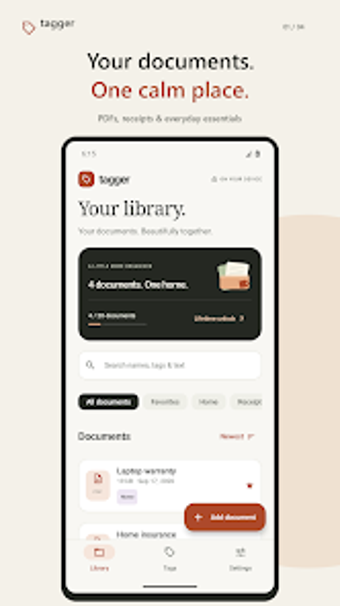
Tagger: Offline Android document organizer with on-device OCR
Scan receipts, import PDFs, and assign custom tags to build a searchable, local document library directly on your Android device. Tagger: Document Organizer, from Mert Tufan Vatandost at Canlidoviz.co, is a privacy-focused utilities-tool that stores files on-device without accounts. It combines on-device OCR for search, expiry reminders for warranties or insurance, and simple sorting and favorites, aimed at users who want private, straightforward digitization without cloud sync.
What core tasks does Tagger handle?
Tagger consolidates PDFs, photos, receipts, and warranties into a single library by importing existing files or using the built-in camera to capture new documents. The interface emphasises a custom tagging system that lets you apply and rename tags across the whole collection, plus library sorting by name, date added, or expiry date. Expiry reminders let you track dates for policies or warranties inside the app.
How does it affect device resources during use?
The app performs text recognition and other work entirely on the device, which removes network transfer overhead and keeps processing local. It requires camera permission for scanning and notification permission for reminders. The developer describes the tool as a lightweight utility, so the design prefers a simple interface and local processing rather than a background cloud service; this reduces network activity but uses the device CPU and storage for OCR and saved files.
Is my data secure and who is the app best for?
All documents remain in the app's private local storage and no account or automatic cloud upload is required, giving users direct control of their files. Manual backup and restore options exist behind a Pro tier for users who need export control. Multi-language UI support is included. The app suits privacy-minded users who need offline document retention and tag-based retrieval rather than integrated cloud syncing.
Practical privacy-first organizer with an OCR limitation
Tagger is a sensible option for Android users who want to digitize and keep documents entirely on-device, offering tag-driven retrieval and local expiry alerts. One important limitation is that its on-device OCR supports Latin-script PDFs and images only, so text search will be effective primarily for documents using those scripts. For users who need offline control and simple tagging, it performs as intended with that script constraint.